Category Archives: ICT

OneNote and BYOD

As I mentioned in my last post, I’ve been doing some holiday research into ideas which could help integrte ICT within learning and teaching in a BYOD environment.

This has led me to look at hardware and software suitable which Is largely operating system platform independent.

There is of course, a lot of browser based software out there which help to make bring your own device possible. And in Scotland we are further aided in our National Education intranet called GLOW.  The recent upgrades to GLOW to include a O365 SharePoint tenancy for all pupils and teachers further augments the range of tools which pupils can have at home.  As all users can now have access to Microsoft Word, Excel, PowerPoint and OneNote coupled with 1TB of cloud based storage in OneDrive (Microsoft’s Dropbox equivalent.)
hXYVJ_U4_200x200The purpose of OneNote has always eluded me somehow as I have always felt that I could achieve the same or better in Word or Publisher. However, OneNote in the context of learning coupled with the ClassCreator tool form a very powerful complimentary partnership.

To explain, OneNote behaves like a pupil’s jotter (or exercise book for non-Scots) where each curricular subject could have a notebook with multiple tabs representing topics and multiple pages for either lessons or sub topics and tasks.  Other uses too could include e-portfolios. When you couple this with the fact that OneNote is available for everyone on every platform and free to all learners then we have a powerful tool for learning. In my mind the light bulb has switched on.
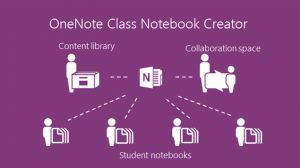
OneNote ClassCreator which is available in SharePoint O365 (GLOW) takes this a stage further allowing teachers to create OneNote notebooks which are allocated to their pupils both tasking them and simultaneously allowing pupils to have the work monitored and corrected (without even the perceived public humiliation of a teacher standing over a shoulder.) There are a number of good video tutorials about this which both demonstrate this in action and can take teacher through the process.

First, watch Microsoft in Education’s YouTube channel.  There are 34 videos many of which show the power of OneNote used by pupils coupled with a suitable device.  The use of handwritten entries in OneNote is of particular interest.

Second, look at www.onenoteforteachers.com. This shows teachers how to use these tools to set up the class notebooks and how to get the most out of OneNote.

Issues?  I always like to identify any downsides too!  O365 web based versions are limited as are the apple and Android versions.  Microsoft understandably want to sell windows kit therefore the most fully featured versions of all applications are available in Microsoft Office 2013.  It’s also worth using this as it integrates from the desktop directly into GLOW. However, this is worth the effort in my opinion. GLOW wouldn’t  let me log in to OneNote without a Microsoft account and it didn’t like my GLOW login details.  I’m assuming that this is a current glitch that will be resolved soon. Just as ClassCreator wasn’t working until on day of this week.

Overall, this looks like a really useful tool which I plan to explore further in the current weeks.
HP Streams and BYOD

The Christmas Holidays have come upon us and that provides a little downtime to facilitate some thinking about new things.  This holiday I have been considering the implications of how bring your own device could ever work.  Of course this really means that I’ve been investigating the killer hardware and software which would allow this to work. New and favourite pieces of hardware include the new line of products from HP.

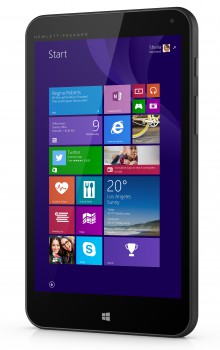
The new HP Stream products further demonstrate the cloud based nature of modern ICT.  The range includes a 7 inch (£99) tablet, 8 inch (£149) tablets, 11 inch (£169), 13 inch (£229) and 14 inch laptops (£229).  They have also just announced a HP Stream mini desktop (~£120).

HP Stream 7

HP Stream 7

The key thing with all of these devices is their low price point. I am writing this post on a HP Stream 7 signature edition which I bought from the Microsoft store at the sale price of £79 with free postage.  It’s terrific!  I have thoroughly enjoyed using it and as an avid fan of all things Apple I have been quite happy to put my other toys aside in favour of this budget device.  As a possible tool for pupils at school this little device can pack a punch and runs Microsoft Office (bundled for a year) with ease. When you consider the ability for Scottish Schools to use windows based devices like this with the national O365 SharePoint tenancy in GLOW then these little devices have the potential to change productivity in the classroom.  They also have a fairly parent friendly price compared to Apple devices whilst still allowing access to industry standard applications.

The only downsides which I have discovered are the battery life, as whilst I get a fair few hours from the device it’s not an all day battery, and the cameras are pretty poor. But what do you expect for this price?  These haven’t affected the usability of the device for most purposes.

Next, you need the killer apps… My research took me to a variety of applications including OneNote coupled with ClassCreator.  However, that is worthy of it’s own post and will come next.

————

This article focuses on the HP Stream devices.  Other PC, Apple, ChromeOS and Android devices will also work with GLOW.

A blog server us born…

At least three years ago, everybody seemed to be learning to blog. There were a multitude of people blogging via blogger, wordpress and other platforms and I felt it was my turn to join in too. After looking around, and  given my reluctance to divulge my personal information to the web, I decided that a self hosted version of WordPress seemed to be the way to go. Since then I have had a blog of sorts which I have broken, lost and not posted to on a regular basis. However, I will persevere and recognising the merits of blogging I started to bandy about with the concept of building a school server which would allow the pupils to have a blog which they could post to internally within our school network. This blog would allow pupils to build up a personal blog, recording achievements and displaying their work from around the school. I also expected that in time we would be able to theme the site and that they could build their own personal theme learning some HTML, CSS and a little about PHP.

After discussing it with some of my Senior Management Team (SMT) colleagues, the idea of using such a blog as a tool for personal learning planning and as a record of achievement, the idea was sealed and a concept was born. Implementation took me on the following journey…

Welcome

Welcome to My wordpress eduk8ional blog. I plan to post my favourite computing thoughts here and let you know what’s going through my mind.

I have been working on my own eduk8ional blog server for the last two years and I plan to tell you of my journey and share some of my bright ideas for fellow colleagues who may be interested.

Many thanks to all those who posted help and advice on their blogs and who have thereby steered me in the correct direction during my project.

Colin MacLeod